Approvals and collaboration
A task shows who is responsible, what is complete and which step comes next. Roles and approvals connect the app with the way the organization works.
Design focusRoles · Approvals · Interfaces
MULTI-PLATFORM APP DEVELOPMENT · BERLIN
One product. Every platform.
We connect web, iOS, Android and desktop through shared product logic and an experience designed for each device.
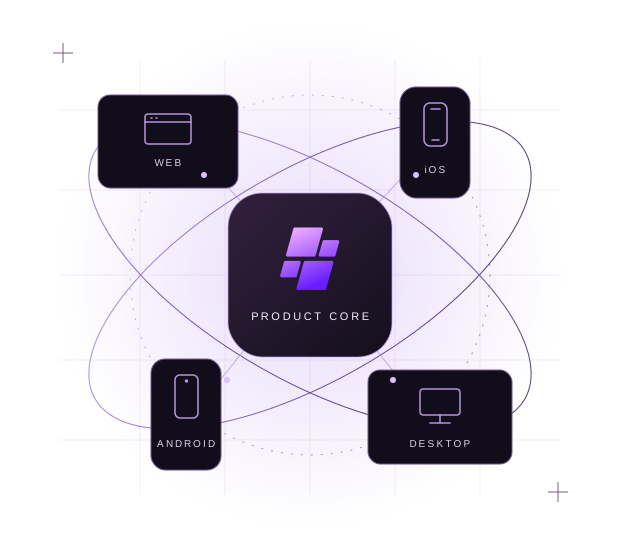
Plan in the office. Document on site. Review on desktop. We design the handovers too: the task remains clear, access is defined and its current state is visible. Each platform provides the views and input methods its context calls for.
Apps connect people with a task and the information it needs. We design that connection for different contexts and existing systems.
A task shows who is responsible, what is complete and which step comes next. Roles and approvals connect the app with the way the organization works.
People find their tasks and continue them on the right device. Sign-in, clear state and access to the required information form one connected flow.
Brief sessions, a camera and changing connectivity shape the design. We establish which data must be available on site and how saved edits are transferred later.
A site inspection connects office planning with fieldwork. This design study shows how planning, documentation and review can work across devices. Choose a platform.
Concept study · fictional data.
Illustrating how a product adapts to each platform.
The web view brings together open tasks, responsibilities and the next step. It focuses on overview and collaboration.
Site inspection
Next step
A focused flow guides the inspection. Device cameras and appropriate permissions are considered where the task needs them.
Site inspection
Local editing and a clear transfer state make interrupted journeys understandable. Synchronization and conflict rules are planned for the individual project.
Site inspection
Keyboard input and a split workspace help compare results, notes and follow-up questions.
Site inspection
A considered starting point
The first platform follows the task. We compare access, device functions and daily use before defining the initial release.
Useful for portals, team planning and access without an app installation.
Relevant when touch, camera, notifications or work with intermittent connectivity shape the task.
Useful for extensive input, several windows and integration with the workplace.
Shared product logic keeps later platforms connected. An offline mode or device integration is designed and scoped for the specific project.
An approval process should follow the same rules on every device. Its screens can differ. We separate business rules, data and interaction, then determine which components the platforms should share.
Schematic architecture principle. Actual system boundaries and shared components are defined for the project.
Who can edit what? When is a task complete? Roles, approvals and states form a clear model across every platform.
Touch on site, a keyboard at the desk, a camera when it helps. Navigation and device capabilities follow the actual tasks.
Business systems exchange data through defined contracts. Failure cases, access rights and version changes have clear owners.
Relevant devices, accessible interaction, failure cases and release paths become reviewable criteria. The project scope defines the checks.
Decisions, work in progress and responsibilities remain understandable. Your team can review, take ownership of and develop the product further. The proposal defines the actual deliverables.
Target users, key tasks, priority platforms and an initial scope. This makes the first release and possible later stages explicit.
Documented decisions about data, interfaces and shared components. Technical limits and dependencies remain understandable.
Intermediate versions and agreed acceptance criteria. Relevant use cases and failure scenarios inform the checks.
Source code, documentation, accounts and responsibilities are handed over within the agreed scope. Maintenance and updates have a defined framework.
First, we clarify the task. Then we investigate the assumptions the implementation depends on. Each step provides a basis for the next decision.
We establish who uses the app, which task it supports and which systems already exist. This gives platforms and features a reasoned order.
User journeys, prototypes and technical checks help examine critical assumptions. Interfaces, offline needs and security boundaries are considered before larger implementation steps.
We implement agreed features, discuss intermediate versions and check them against concrete criteria. Findings inform the next decisions.
Release paths, store accounts, approvals and responsibility for operation are clarified. Further development, maintenance and updates are agreed separately.
Which task costs people time? Which information is missing? Which technical constraint matters? Digital Science connects those questions with product research, data models and software development. Prototypes and focused investigations provide evidence for the next step.
What needs to continue when switching devices?
One shared task avoids duplicate input.
A prototype reveals unclear transitions.
Refine state and feedback with a clear purpose.
↶ The findings inform the next question.
When several user groups or contexts need the same product rules and data. Shared components can make ongoing development easier. Whether they are economical depends on device capabilities, platform differences and maintenance needs, among other factors.
No. We first consider where the product offers concrete value. An initial release may focus on one platform. The architecture considers later stages where they can already be anticipated.
Existing products can be a starting point. We first clarify source code, interfaces, rights and technical dependencies. We can then decide which parts to keep, adapt or replace in stages.
From user journeys, device capabilities, performance, team and operation. We compare possible approaches and explain key trade-offs. You do not need to have chosen a framework before an initial discussion.
We examine access rights, data flows, storage locations and relevant failure scenarios in the design. Specific safeguards, legal requirements and checks are defined for the individual project.
Primarily scope, platforms, interfaces, data migration, quality requirements and external approvals. A useful proposal needs a defined scope and named dependencies. Approval by independent app stores cannot be guaranteed.
Operating systems and connected systems continue to change. Responsibilities for operation, updates, fixes and extensions are therefore explicitly agreed. They are not automatically included in every development contract.
With an email to mail@deepburg.com. Describe the goal, future users and existing systems. A complete specification is not required. Credentials and other confidential information should not be included in the initial enquiry.
Describe the workflow, the people behind it and the change you want to achieve. Existing systems and open questions help us define a useful first development step.
Discuss your idea by emailNo form. No tracking. No embedded third parties.Four useful details for your first email